An objective technical evaluation of all 6 methods used by architects and BIM managers to diagnose invisible elements: manual checking, Ideate Xray, Holmes by Camilion, bulk unhide utilities, Dynamo scripts, and Karo.WhyHidden.
Executive Summary · At a Glance
Which Revit visibility tool should you choose?
Large AEC Enterprises
Ideate Xray
Exhaustive forensic coverage for organizations with existing Ideate suite enterprise agreements.
Fast Production Audits
Karo.WhyHidden
16-point diagnostic scan under 3s with in-dialog remediation buttons at $9/mo or $69/yr per seat.
Manual / Zero-Addin Policy
Native 16-Point Checklist
Methodical manual verification across dialogs for restricted environments without third-party add-ins.
The reality of missing elements in Revit: a 16-layer sieve
If you work in Autodesk Revit, you know this scenario: you place a wall, door, structural column, or MEP pipe, open a plan view, and the element is gone. You toggle the lightbulb icon (Reveal Hidden Elements), but the drawing area remains empty. The element exists in schedules, but it refuses to appear on your working drawing.
Official Autodesk Revit Warning Dialog:
“None of the created elements are visible in Floor Plan: Level 1 View. You may want to check the active view, its Parameters, and Visibility/Graphics settings, as well as any Plan Regions.”
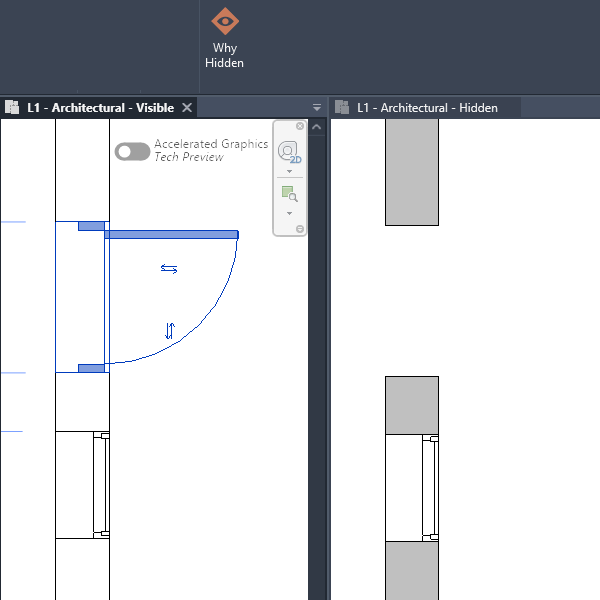
Visible instance vs. hidden in active sheet view.
This happens because Revit does not have a single “Hide” toggle. Instead, graphic visibility is governed by a 16-layer filtering sieve. For an element to appear on screen, it must simultaneously satisfy every single layer:
01Category & Subcategory visibility in VG
02View Filter color & transparency overrides
03View Range cut planes & depth clipping
04Workset visibility states & overrides
05Phasing & Phase Filter mapping
06Primary vs. Secondary Design Options
07Scope Box & 3D Section Box limits
08Annotation Crop & Model Crop Regions
09Detail Level (Coarse vs Fine geometry)
10Temporary Hide/Isolate sessions
11Discipline clipping (Arch vs Struct vs MEP)
12Plan Region local cut plane overrides
13Linked RVT file instance overrides
14Invisible lines applied via Linework tool
15View-specific drafting element placement
16Controlling View Template property locks
Troubleshooting this manually requires opening 10 to 15 modal dialogs, guessing which setting is responsible, and risking accidental detachment of office View Templates. Below is how the industry's available solutions compare.
Feature & Specification Matrix
Side-by-side comparison across speed, diagnostic coverage, template safety, and pricing.
Evaluated: 6 Methods
Tool / Method
Working Principle
Speed
Diagnostic Depth
1-Click Safe Fix
Template Protection
Pricing
Native Revit Manual Checklist
Built-in / Free
Sequential manual inspection across 10-15 dialogs
10-25 minutes
Up to 30 parameters (human dependent)
No (manual parameter adjustments)
High risk of accidental template detachment
Free (included with Autodesk Revit)
Ideate Xray (Ideate Software)
Enterprise Suite
Automated Revit API visibility graph audit
3-5 seconds
30+ deep system parameters
Yes (guided step-by-step wizard)
Fully protected with template alerts
$495-$995 / year / seat (as of 2026)
Holmes (Camilion)
Comparative Utility
Algorithmic comparison against a reference view
5-15 seconds
~15-20 common visibility causes
Yes (contextual in-dialog prompts)
Flags view template locks
€40-€60 perpetual license (as of 2026)
Bulk Unhide Utilities (App Store)
Basic Add-in
Mass-reset of local element-level hide flags
Instant (no diagnostic)
1-2 causes only (direct element hides)
Mass unhide across active view
Ignores templates; risks sheet corruption
Free to $20 one-time (as of 2026)
Custom Dynamo Scripts
Open-Source / DIY
Visual script nodes run via Dynamo Player
1-3 minutes (session launch)
5-8 hardcoded causes
Limited to node script logic
Depends on script author and maintenance
Free (requires in-house maintenance)
Karo.WhyHidden
Precision Instrument
16-point synchronous Revit API diagnostic scan
< 3 seconds
16 critical production causes
Yes (1-click Unhide & Reset Overrides)
Protected with explicit template owner badges
$9 / month or $69 / year (as of 2026)
Empirical Testing Conditions
Diagnostics benchmarked on Autodesk Revit 2024 with a 450 MB model file containing over 85 000 elements across architectural and MEP disciplines. Diagnostic execution was tested on an Intel Core i7 workstation with 64 GB RAM. Tool times measure API query and audit latency; manual times reflect standard multi-dialog inspection duration for an experienced BIM coordinator.
Detailed Profile of Each Solution
Objective evaluation of strengths, limitations, and optimal operating contexts.
Method 01Free / Built-in
Native Revit Manual Checklist
The default trial-and-error procedure: clicking the lightbulb icon, cycling through Visibility/Graphics tabs, inspecting View Range offsets, and checking Phase Filters.
Zero software cost; universally available on every seat.
Deepens foundational understanding of Revit's graphics engine.
Takes 10-25 minutes per incident on complex linked models.
Modelers frequently detach View Templates in frustration, corrupting drawing consistency.
Best for: Solo practitioners and students working on small residential models with minimal worksets.
Method 02Enterprise Suite
Ideate Xray (Ideate Software)
The industry's most comprehensive enterprise forensic add-in. Queries the Revit view database to discover why an element is missing, accompanied by an interactive wizard.
High cost ($495-$995/yr/seat) as part of Ideate suite packages.
Enterprise UI density can be overwhelming for everyday drafting tasks.
Best for: Large AEC enterprises that already subscribe to Ideate Software suite licenses firm-wide.
Method 03Comparative Add-in
Holmes (Camilion)
An algorithmic approach that prompts the user to select the element in a view where it is visible (e.g. 3D view), comparing graphic overrides against the target view where it is missing.
Dedicated, clean utility focused specifically on visibility issues.
Fair perpetual licensing model (€40-€60/license).
Requires an existing view where the element is already visible.
Less effective if an element was newly pasted and is hidden everywhere.
Best for: Studios seeking a single-purchase standalone add-in that prefer reference-view comparison.
Method 04Basic Utility
Bulk Unhide Utilities (App Store)
Lightweight add-ins that offer a one-button “Unhide All Elements in View” feature, clearing element-specific hide toggles.
Instant execution; very inexpensive or completely free.
Quickly resets accidental manual hide commands.
Does not diagnose root causes (ignores filters, view ranges, worksets).
Can unhide construction annotations and demolition objects by accident.
Best for: Emergency cleanups when someone repeatedly used “Hide Element in View” instead of proper filters.
Method 05Open-Source / In-House
Custom Dynamo Scripts
Visual programming scripts deployed via Dynamo Player to query element visibility states and force parameter overrides.
Zero software licensing cost; fully adaptable to proprietary parameters.
Can be extended into larger model quality control routines.
Slow execution startup (1-2 minutes to initialize Dynamo Player).
Frequently breaks when updating to newer Revit API versions.
Best for: Firms with dedicated computational BIM managers who actively maintain custom Dynamo libraries.
Method 06Precision Instrument · $9/mo
Karo.WhyHidden
Engineered strictly for fast, friction-free resolution: evaluates 16 visibility subsystems upon element selection in under 3 seconds, offering safe in-dialog 1-click unhide buttons.
Diagnoses 16 root causes simultaneously in < 3 seconds.
Instant “Unhide” and “Reset Overrides” buttons right in the diagnostic panel.
Flags controlling View Templates to protect corporate drawing standards.
Focused strictly on view diagnostics; does not manage warnings or room renumbering.
Best for: Production teams and architects seeking fast, reliable diagnostics.Full WhyHidden specs
Decision Guide: How to choose your solution
1. You already have an active Ideate Software enterprise agreement
Recommendation: Use Ideate Xray. It is already deployed across your workstations, covers edge cases thoroughly, and does not require additional software procurement.
2. You have zero software budget and strict IT installation policies
Recommendation: Use the Native 16-point checklist. Bookmark our free step-by-step diagnostic checklist to train modelers to methodically check View Range, Filters, Worksets, and Phases before asking a senior coordinator.
3. You want fast, self-serve problem solving for architects without enterprise pricing
Recommendation: Choose Karo.WhyHidden. At $9/month or $69/year, it replaces repetitive 10-15 minute manual diagnostic sequences with a 3-second automated scan, while protecting office View Templates from accidental detachment.
Next Steps · No Commitment
Resolve your visibility issue right now.
Choose the path that fits your current project constraints: walk through our free technical checklist manually, or download the automated tool and diagnose it in under 3 seconds.
Supports Autodesk Revit 2023, 2024, 2025, 2026, 2027. Clean MSI installer. Zero cloud telemetry. No registration or credit card required for 14-day trial.
Frequently Asked Questions
Why do elements disappear or become invisible in Autodesk Revit?
Revit graphic visibility is governed by a 16-layer filtering sieve. An element must pass through Visibility/Graphics categories, view filters, view range cut planes, workset visibility, phases, design options, crops, and view templates. If any single parameter rejects the element, it is omitted from the view canvas.
What are the main alternatives to Ideate Xray for studios without enterprise suites?
For studios that do not maintain Ideate Software enterprise agreements ($495-$995/year), the primary dedicated alternatives are Karo.WhyHidden (for direct 16-point root-cause diagnosis at $9/month), Holmes by Camilion (for comparative reference-view analysis at €40-€60 perpetual), or custom in-house Dynamo scripts.
Can troubleshooting invisible elements break company View Templates?
Yes. When modelers manually troubleshoot invisible elements without diagnostic tools, they frequently detach or edit assigned View Templates out of frustration, creating drawing inconsistencies across sheet sets. WhyHidden safeguards templates by explicitly indicating template ownership without breaking assignments.
Is there a free way to find missing elements in Revit?
Yes. The native built-in workflow (the lightbulb icon, Visibility/Graphics VV dialog, and View Range adjustments) is completely free. Teams with in-house computational designers can also deploy free open-source Dynamo scripts via Dynamo Player.