Revit Error Explained6 min read

Revit "Specify descriptive text for a dimension segment instead of a numeric value": what Revit is protecting you from

Why Revit refuses a number in Replace With Text, how to change a dimension the right way, and why the usual workarounds leave fake dimensions in the drawings.

Updated: October 2026·Revit 2023 - 2027
Revit dialog: Invalid Dimension Value
Specify descriptive text for a dimension segment instead of a numeric value. To change the dimension value for a length or angle of a segment, select the element the dimension refers to, and click the value to edit it.
Quick answer

What it means: Replace With Text accepts words such as EQ, VARIES or HOLD, but not a number. A number would make the dimension show a value that the model does not have.

Right fix: close the dialog, select the element that should move (not the dimension), click the blue dimension value and type the new distance. The element moves and the dimension stays true.

01Why Revit Refuses

A dimension in Revit reports geometry, it does not define it

A Revit dimension measures the distance between two references. If you could type 3000 over a measured 2985, the sheet would show a size the model does not have, and nothing would warn the contractor. Revit therefore blocks numeric text in Replace With Text and shows the Invalid Dimension Value dialog.
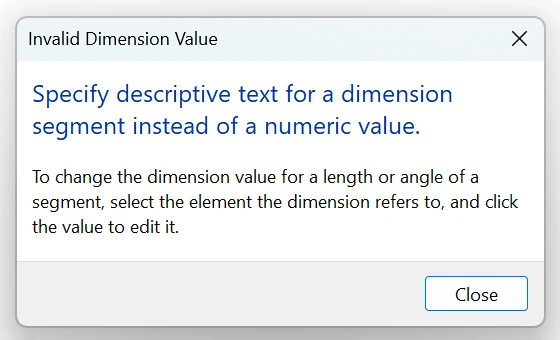
Revit 2026 Invalid Dimension Value dialog: Specify descriptive text for a dimension segment instead of a numeric value
Revit 2026: the dialog after typing 3000 in Replace With Text.
Fix

Decide which element is wrong and move it. Select that element, click the dimension value that appears in blue, type the correct distance and press Enter. Lock the dimension (padlock) if the relationship must be kept.

Quick Check

If the element will not move, check that it is not pinned, constrained by another locked dimension or hosted on something that is.

02Unexpected Decimals

The dimension shows 2999.6 or 2'-11 63/64" instead of a round number

This is usually the real reason people try to override a dimension. The element is slightly off, often after tracing CAD, rotating, or snapping to the wrong face. Rounding in the dimension type can hide this, which only moves the problem to site.

Fix

Temporarily set a finer rounding in the dimension type (Edit Type > Units Format) to see the true value, then fix the element position. Set rounding back afterwards.

Quick Check

Odd values on several dimensions along one line usually point to one element that is off, not many.

03Legitimate Text

When text in a dimension is fine

Descriptive overrides are allowed because they do not pretend to be a measurement: EQ, VARIES, HOLD, MIN, MAX, TYP or a note such as "to finish". Revit also has Prefix, Suffix, Above and Below fields that add text while keeping the real value visible.

Fix

For equal spacing use the EQ toggle on the dimension instead of typing EQ. For notes, use Above or Below in the Dimension Text dialog so the measured value stays on the drawing.

Quick Check

If the real value still shows next to your text, the dimension is honest.

04Fake Dimensions

Workarounds that pass the check, and why they are risky

Users on Revit forums report that typing "3000 mm", "(3000)" or adding a dash makes Revit treat the entry as text, so the dialog does not appear. Such a dimension never updates: if the wall moves later, the sheet still says 3000. Revit has no built-in report of these overrides, so they are found only when something does not fit on site.

Fix

Do not use numeric-looking text overrides. To audit an existing model, select dimensions on key sheets and open the Dimension Text dialog: a filled Replace With Text field is an override. Fix the geometry and clear the field.

Quick Check

A dimension that does not change when you drag the element it measures is overridden.

05Team Standards

Make the rule enforceable for the whole team

Most BIM standards already say "no dimension overrides", but nothing in Revit enforces it for descriptive text, and a deadline makes the workaround tempting. The damage is invisible until coordination or fabrication.

Fix

State the rule in the BIM execution plan, list the allowed descriptive words, and review overrides before issue. Karo.ModelGuard can require a written reason for every dimension text override, or block it, and keeps a shared log of who did it and why.

Quick Check

If nobody can tell you how many overridden dimensions are in the current set, the rule is not enforced.

Fake dimensions are one of ten common causes of model decay in multi-user projects. See 10 Revit model health rules for teams.

Frequently Asked Questions

Why can't I type a number in a Revit dimension?

Revit only accepts descriptive text in Replace With Text, so a dimension cannot show a value the model does not have. To change the distance, select the element the dimension measures and edit the blue dimension value, which moves the element.

How do I change a dimension value in Revit?

Select the element that should move, not the dimension. Click the dimension value that turns blue, type the new distance and press Enter. If both referenced elements must stay, the model itself has to change in another way.

How do I find overridden dimensions in a Revit model?

Revit has no built-in list. Open the Dimension Text dialog of suspicious dimensions and check Replace With Text, or test by moving the measured element: an overridden dimension does not update. Add-ins and scripts can list them in bulk.

Is EQ an override?

The EQ toggle on a multi-segment dimension is a constraint, not an override: Revit keeps the segments equal. Typing EQ into Replace With Text only changes the label and does not keep anything equal.

Stop model damage before it reaches central

Karo.ModelGuard asks for a reason or blocks exploding CAD, fake dimension overrides and deleting links, levels and grids, and writes every decision to a shared team log. It does not fix existing warnings; it stops the actions that create them.